Gainflow 2.0: One App for Gym Workouts and Running
Gainflow is a free workout tracker for iOS, Android and the web that keeps strength training, running, cycling and walking in one history, with an AI coach that reads your past sessions and automatic personal-record tracking; the training log has no limits and no ads, and only the AI features run on a token pool.
Version 2.0.0 turned a gym log into that one-history tracker: GPS recording for runs, rides and walks, a route generator and planner, a supplement barcode scanner with stock tracking, and the reworked AI chat, Gainflow AI. Gainflow 2.0.1 adds iPhone home-screen widgets, favorite exercises, Live Activities and a rest timer that keeps counting behind a locked screen.
Gainflow 2.0 at a glance
Gainflow 2.0 is one app for gym workouts and GPS activities. On iPhone and Android it records runs, rides and walks next to strength sessions, generates loop routes, tracks supplements and answers questions from your own training log. Logging is free. AI actions draw on a token pool: 10 tokens a month on the free plan, 50 a week on Gainflow Plus, 100 a week on Gainflow Max.
Features by version, platform and cost
| Feature | App version | Platforms | Cost |
|---|---|---|---|
| GPS activities: run, ride, walk | 2.0.0 | iPhone, Android | Free |
| Route generator | 2.0.0 | iPhone, Android | 1 AI token per suggestion |
| Manual route planner | 2.0.0 | iPhone, Android | Free |
| Supplements: intake log and stock | 2.0.0 | iPhone, Android, web | Free |
| Supplement barcode scanner | 2.0.0 | iPhone, Android | Free, 15 scans a day |
| Gainflow AI chat | 2.0.0 | iPhone, Android | 1 AI token per message |
| AI training plan | 2.0.0 | iPhone, Android | 3 AI tokens |
| AI video technique analysis | 2.0.0 | iPhone, Android | 5 AI tokens |
| Home-screen widgets | 2.0.1 | iPhone | Free |
| Favorite exercises | 2.0.1 | iPhone, Android | Free |
| Live Activities: strength workout, GPS activity | 2.0.1 | iPhone | Free |
| Rest timer behind a locked screen | 2.0.1 | iPhone, Android | Free |
The web app at gainflow.app/app shares the account and has no GPS recording, route tools, barcode scanner or AI chat.
GPS activities: runs, rides and walks next to your lifts
Gainflow 2.0.0 records runs, rides and walks with GPS on iPhone and Android, free and without limits. A finished activity lands in the same history as your strength workouts and counts toward the same weekly goal, active days, streak and distance chart. Recording continues in the background and with the screen locked.
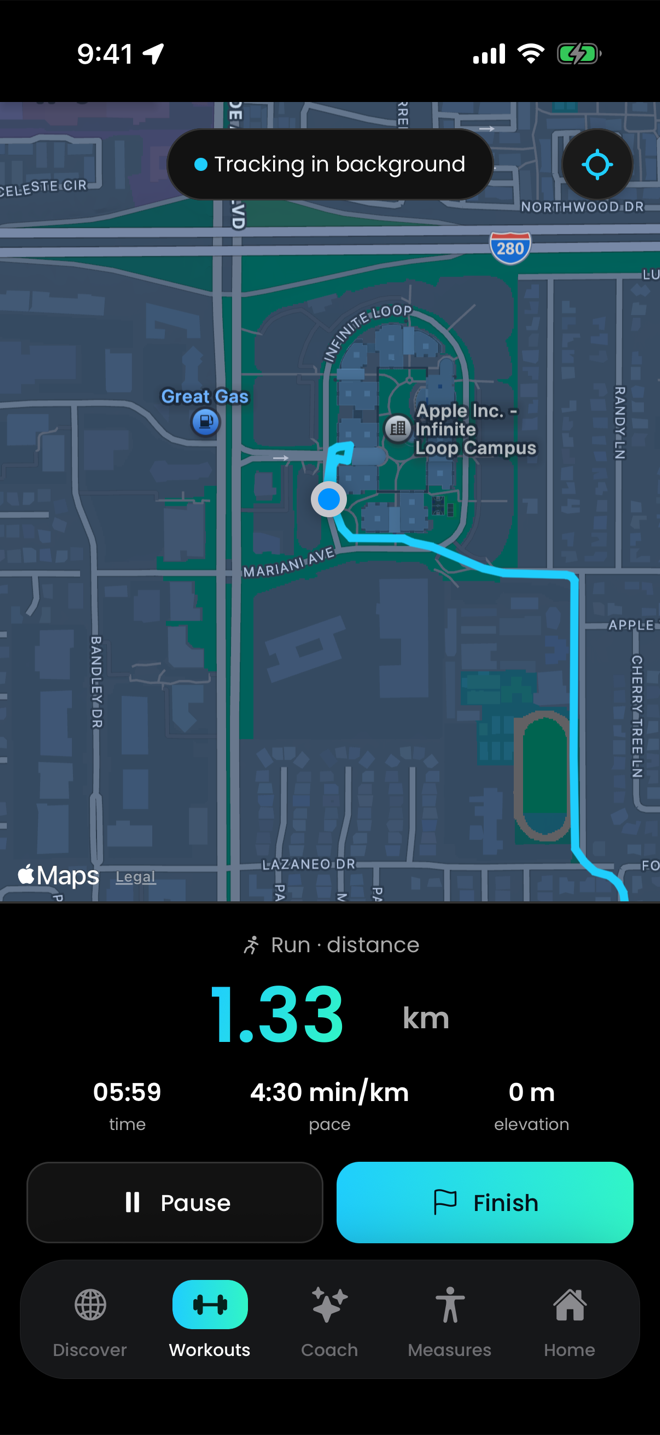
The live screen: a map that follows you, with distance, time, average pace and elevation gain.
You pick Run, Ride or Walk. An interrupted activity can be restored, and a saved route can be shown as a line on the map while you record.
Afterwards you see distance, time, average pace, average speed and elevation, in kilometres or miles. Runs and walks add per-kilometre splits with a pace chart and the fastest and slowest kilometre. An activity can go to the feed like a workout, with up to 3 photos or videos, or stay private.
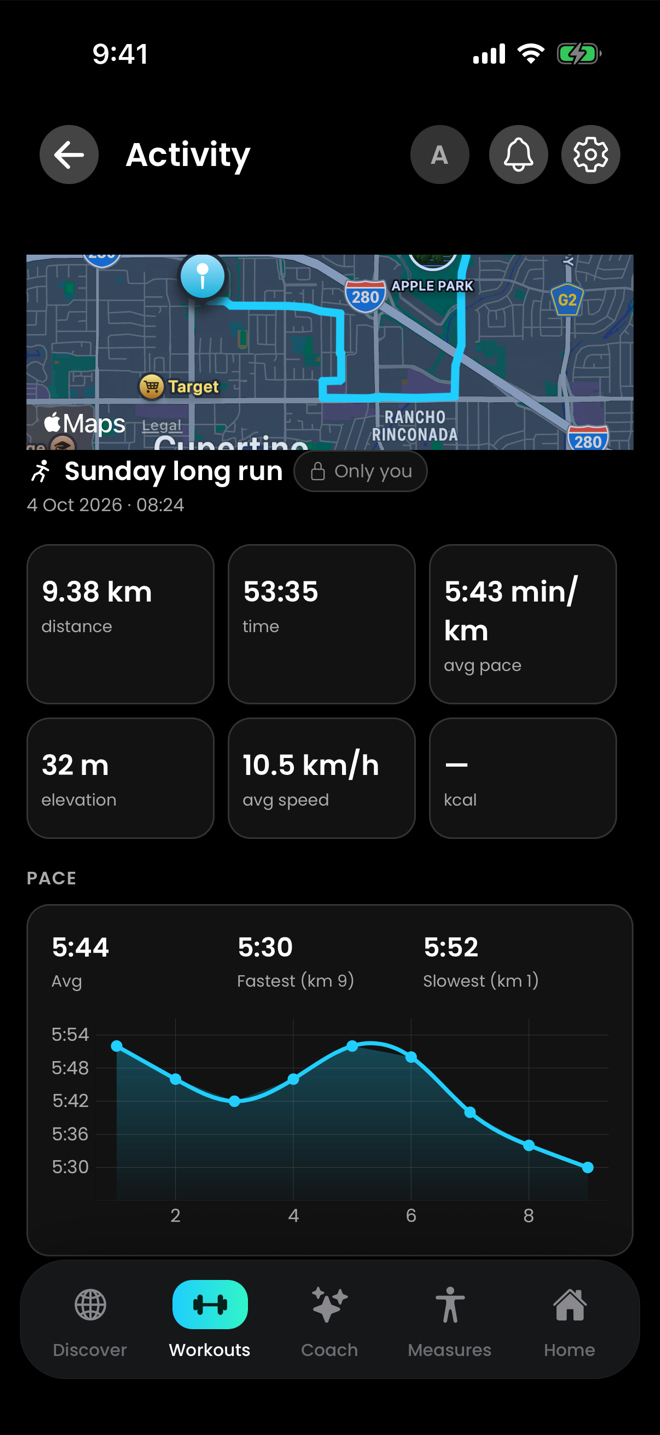
A finished run with its per-kilometre splits.
The "Share full route" switch on the save screen is on by default. Turn it off for an activity and its start and finish are hidden from other people, clipped on the server.
Good to know
- Pause and resume are manual: there is no auto-pause.
- The live screen shows average pace, not current pace.
- No heart rate, cadence, laps, GPX export or turn-by-turn navigation.
- No Apple Watch, Wear OS or Garmin app and no Strava integration.
- GPS activities are not written to Apple Health or Health Connect.
Route generator and planner: loops from 1 km to a marathon
The Gainflow route generator, part of version 2.0.0 on iPhone and Android, draws loop routes along real roads for running, cycling or walking. You set a start point and a distance from 1 km to 42.195 km in 500 m steps and get up to 3 suggestions per request. Each suggestion costs 1 AI token on every plan, and saving one is free.
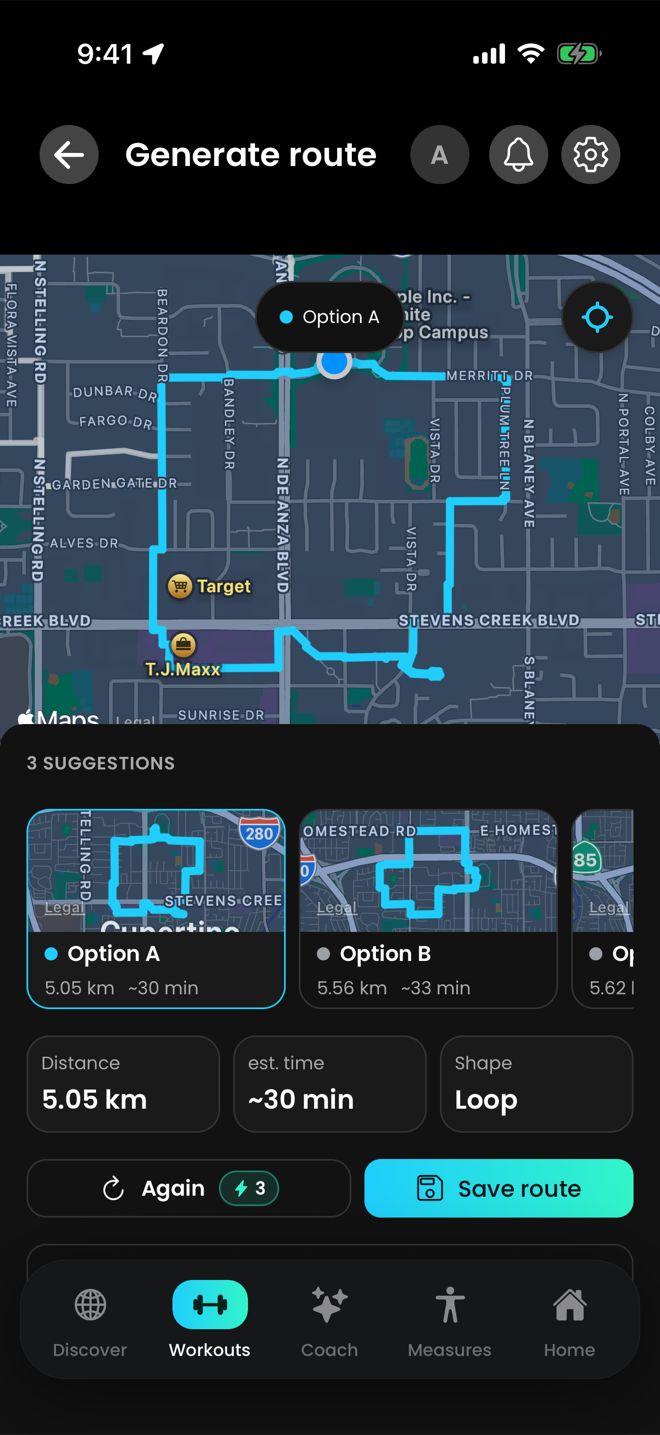
A generated loop on the map.
The start is your location or a point picked on the map. Once you have recorded enough activities, a suggestion shows an estimated time at your own pace. A saved suggestion is a private route you can edit or start as an activity. The manual planner is free: tap the map to draw, and each leg snaps to roads or runs as a straight line.
Good to know
- The generator makes loops, not point-to-point routes, and the distance of a suggestion is approximate.
- Generating needs a connection and AI tokens. The free plan holds 10 a month.
- A saved route is a line on the map, without voice guidance or off-route alerts.
Supplements: barcode scanner, stock and reminders
Gainflow tracks supplements for free. In the iPhone and Android apps you add a product by scanning its barcode or typing it in, log each intake, see how much of the package is left and get a push reminder at a time you choose. Version 2.0.0 brings the barcode scanner and the stock counter.
With "Scan barcode", a scan fills in the name and brand and, where it can, the unit, package size and serving size; you confirm or edit before saving. For an unknown barcode the app says the product was not found and offers manual entry. Nothing is invented.
Stock tracking is optional per supplement. Each intake you log with "Took it" lowers the count, a ring shows what is left, "Running low" appears near 15% and "Empty" at zero. You can log several intakes a day, backdate one and add a note. Reminders are daily, weekly or monthly, and doses use one of 14 units.
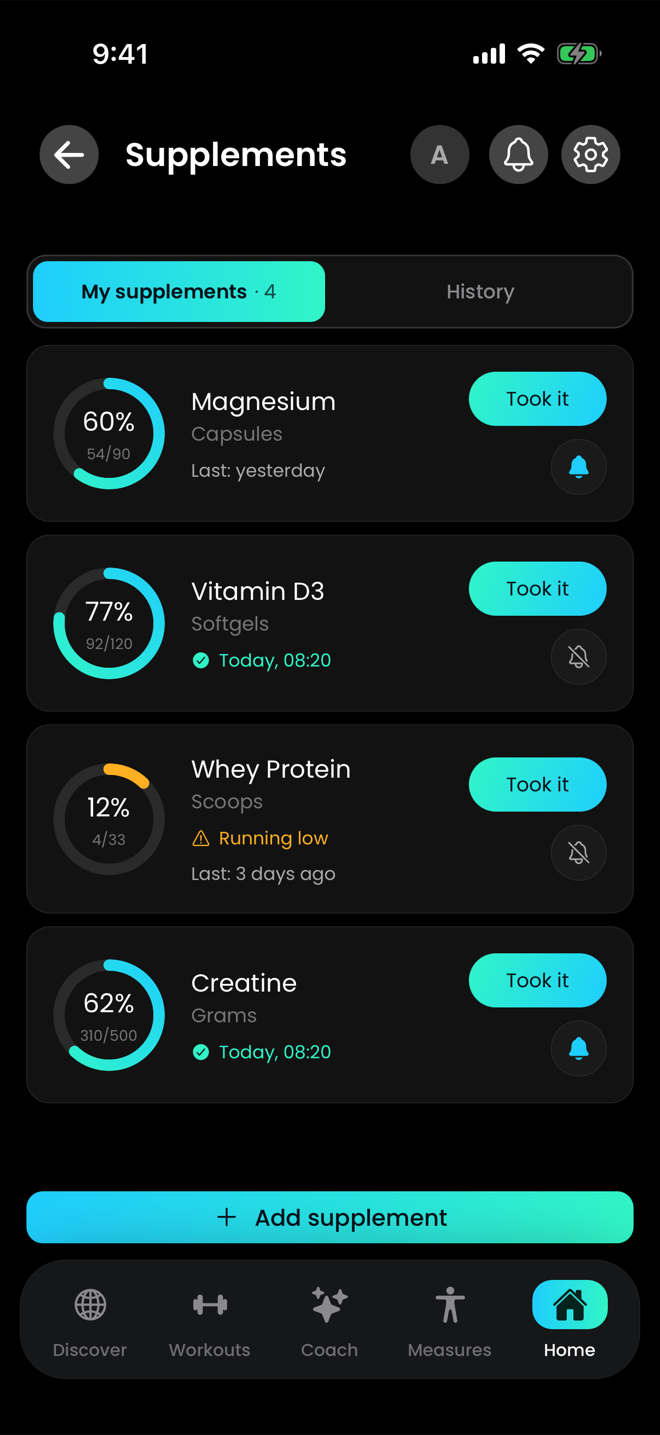
Stock rings show what is left. "Running low" appears near 15%.
Good to know
- The scanner is in the iPhone and Android apps. The web app has none.
- A barcode lookup needs a connection.
- The limit is 15 scans a day.
Gainflow AI: a chat that reads your own training log
Gainflow AI is a chat in the iPhone and Android apps that answers from your own logged data: recent workouts, body measurements, personal records, and analyses such as volume per muscle group, training frequency, plateau detection, left/right asymmetry and strength progress. A message costs 1 token from the AI pool, which holds 10 tokens a month on the free plan.
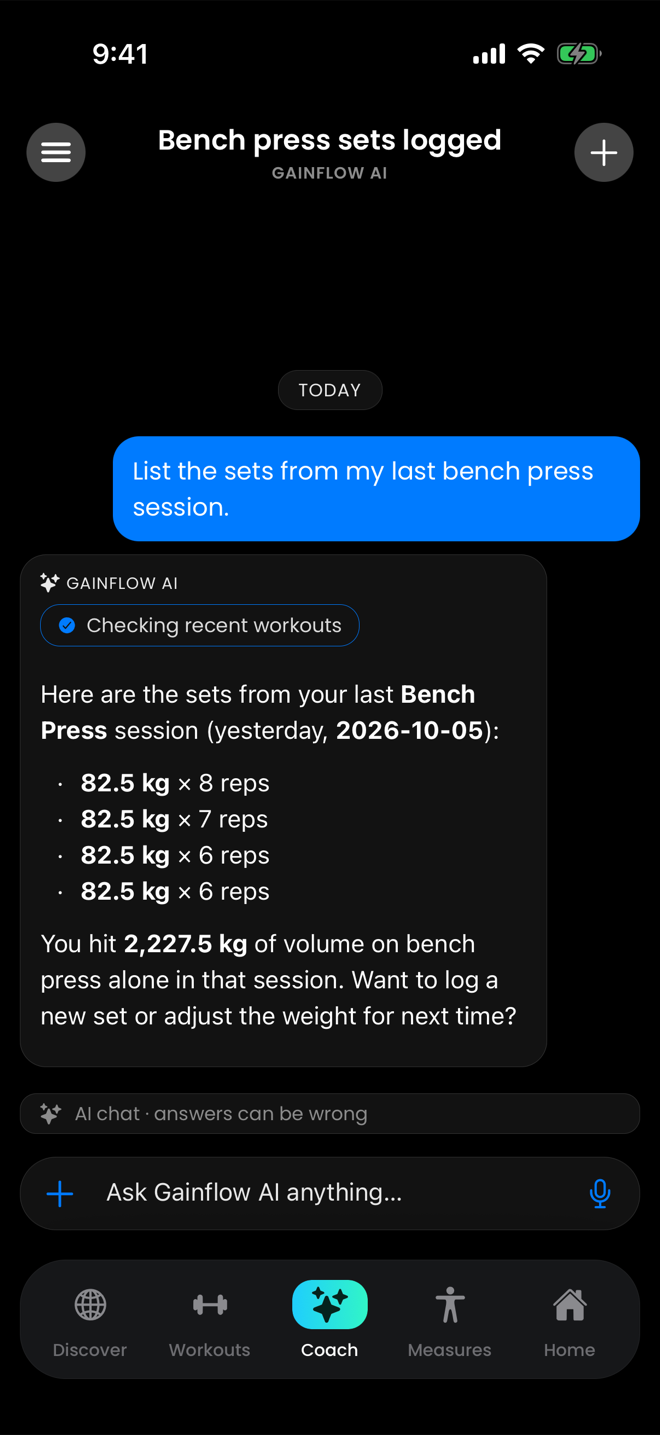
Gainflow AI answers from the workouts you have logged.
- Logging on request. It writes only when you ask: a finished workout, body measurements, a custom exercise, a new or updated weekly training plan.
- Training plan, 3 tokens. 1 to 7 days a week, by goal, place (gym, home, outdoors, trip) and experience level. You review it, then accept it or regenerate it for 1 token.
- Video technique analysis, 5 tokens. A clip of up to 60 seconds returns one of five verdicts with issues, tips and timestamped moments.
- Voice input, no tokens. Hold to record up to 60 seconds and your speech becomes text. It has a daily cap.
Recent improvements run on the server and need no app update. Gainflow AI answers in the language of your last message, logs a dictated multi-exercise workout whole and asks for missing sets, names the catalog exercise when it differs from what you said, resolves relative dates such as "last Friday", and no longer logs runs, rides and walks as strength workouts.
Good to know
- No plan is unlimited, and an action costs the same number of tokens on every plan.
- It answers in text, not speech. Video analysis is not live and gives no numeric score.
- It sees only the signed-in user's data. Daily Apple Health and Health Connect metrics are not sent to AI providers.
- It gives no diagnosis or medical advice, and every AI screen says you are talking to an AI.
New in Gainflow 2.0.1
Gainflow 2.0.1 adds four iPhone home-screen widgets, favorite exercises, iPhone Live Activities for a strength workout and for a GPS activity, and a rest timer that keeps counting behind a locked screen. All of it is free. Favorite exercises and the rest timer are in the iPhone and Android apps.
Home-screen widgets on iPhone
Gainflow 2.0.1 adds four widgets to the iPhone Home Screen, with Lock Screen variants. Each shows what the app last wrote and opens the app.
- Start: today's workout from your schedule or your last one. During a workout it shows the running clock, during rest the countdown.
- Up next: the next workout on your schedule and its first exercises.
- Week: the goal ring, the week's days and the streak.
- Supplements: today's supplements and how many are taken. A tap opens the app with the intake ready to confirm.
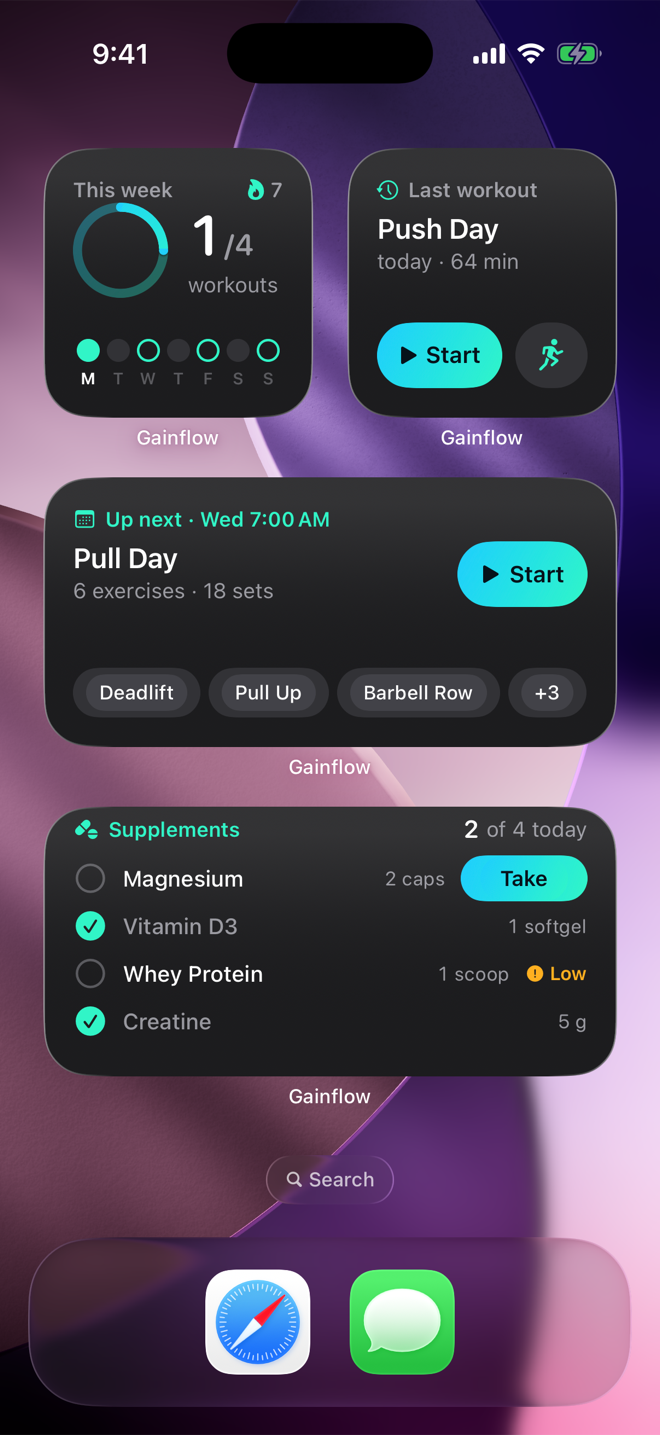
The four Gainflow 2.0.1 widgets.
Favorite exercises
Gainflow 2.0.1 puts a star in every exercise picker and on the exercise screen. Pickers open with a "Favorites & recent" section: all favorites first, then recently used exercises. Favorites are saved to your account.
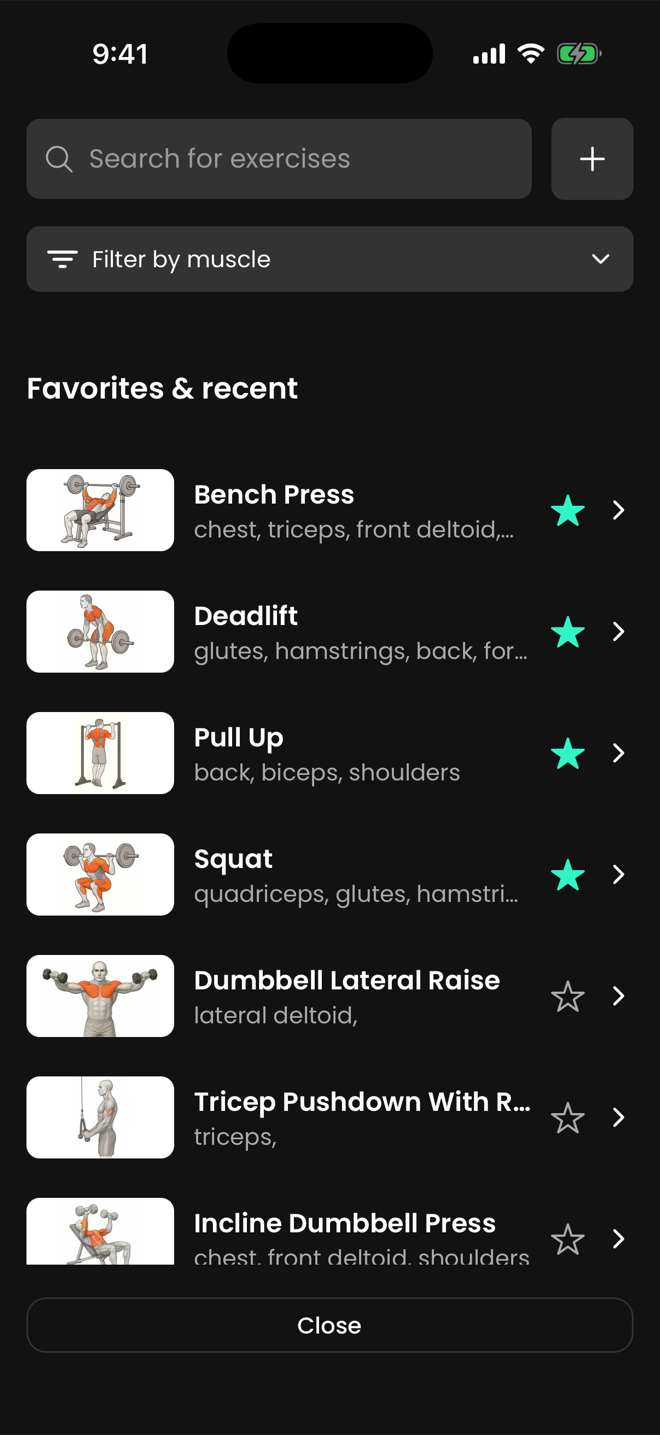
The Gainflow 2.0.1 picker opens with "Favorites & recent".
Live Activities and the rest timer
With Gainflow 2.0.1 on iPhone, a strength workout in progress shows the workout clock and the set count on the Lock Screen and in the Dynamic Island, and the rest countdown during rest. A GPS activity shows its type, time, distance and average pace, and a tap returns to the activity.
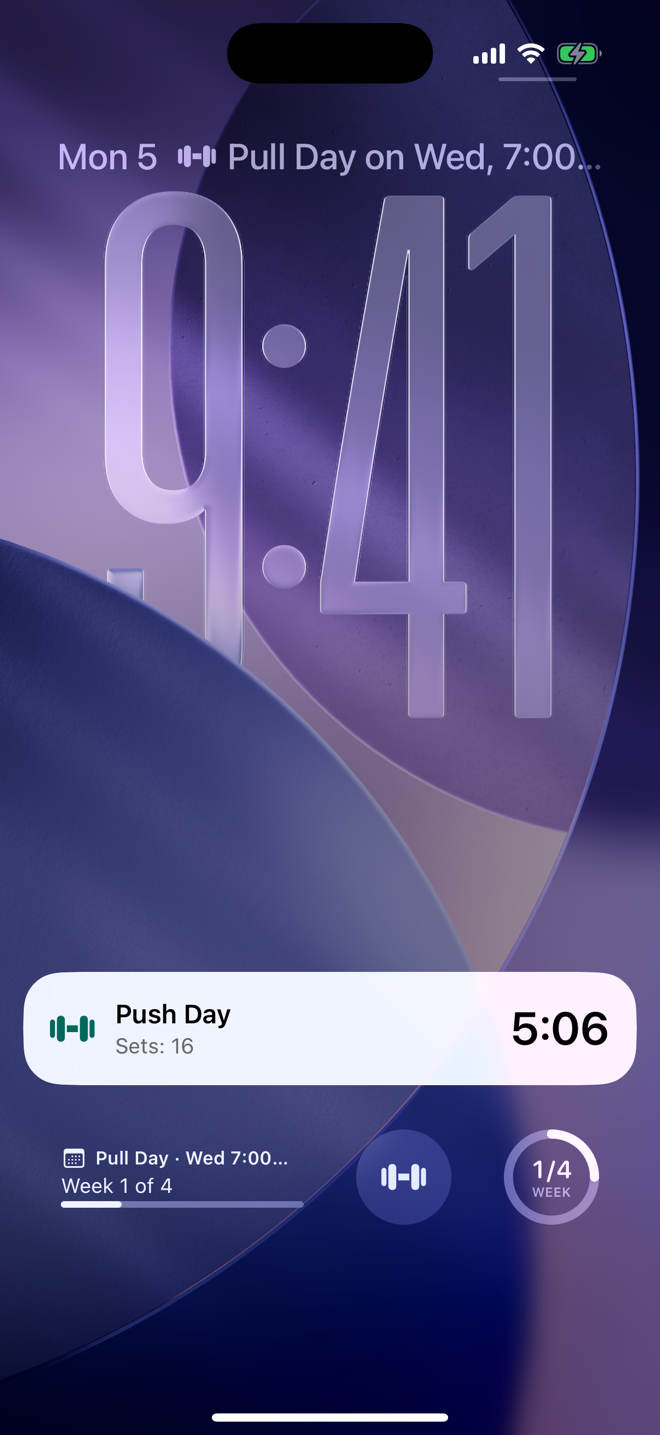
A strength workout on the Lock Screen in Gainflow 2.0.1.
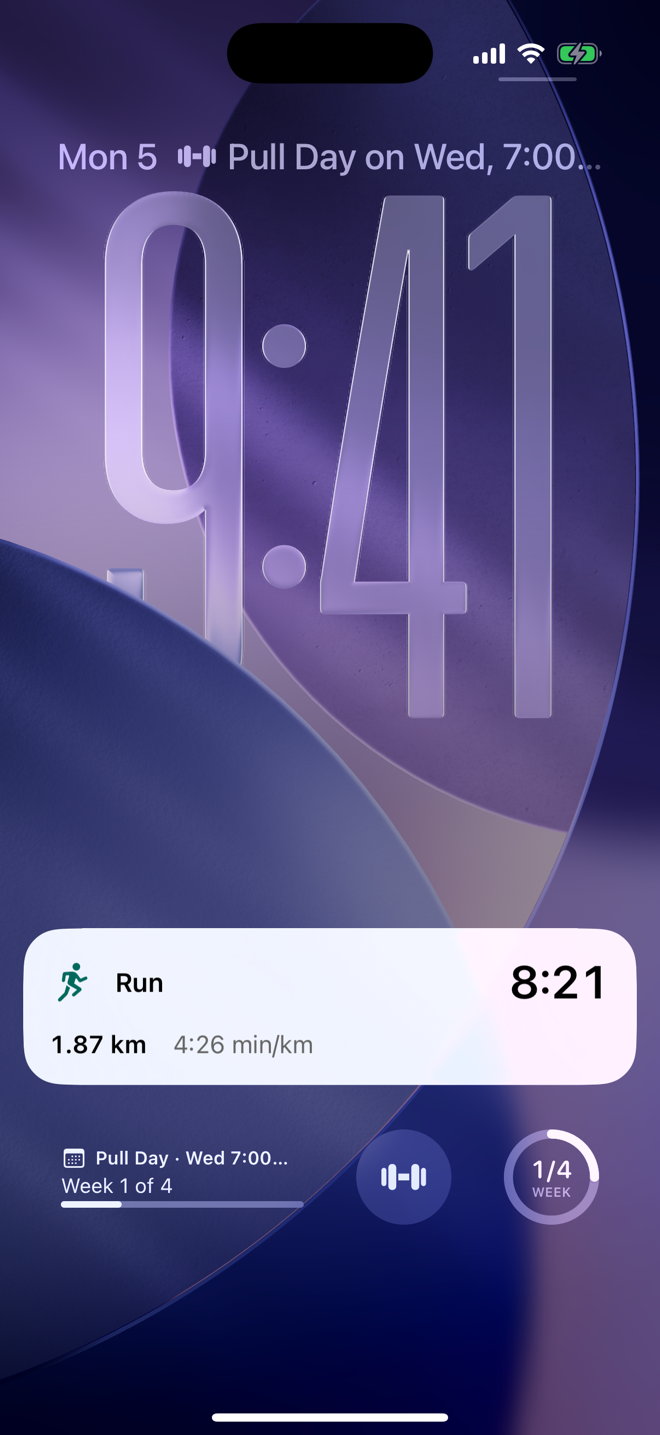
A run on the Lock Screen in Gainflow 2.0.1.
On iPhone and Android, Gainflow 2.0.1 measures the rest countdown against a real end time, so the "rest is over" alert arrives with the screen locked.
Good to know
- Widgets and Live Activities are iPhone only. Android has neither.
- A widget has no button that acts without opening the app, and a Live Activity has no buttons.
- The GPS Live Activity shows average pace, not current pace or elevation.
Who Gainflow 2.0 is for
Gainflow 2.0 is for people who lift and also run, ride or walk, and want one app for both: one history, one weekly goal and one streak for strength sessions and GPS activities, on iPhone and Android, with free logging and no ads.
Does it fit how you train?
Gainflow fits when
Another kind of app fits better when
- You train by heart-rate zones, cadence or laps, or rely on auto-pause.
- You record from a watch: Gainflow has no Apple Watch, Wear OS or Garmin app.
- You need turn-by-turn navigation or GPX export.
- You want widgets or Live Activities on Android.
Gainflow next to Strava and Hevy
A lifter who runs often pairs a running app with a gym log. The table puts Gainflow next to Strava and Hevy on six capabilities, as of October 2026. Every cell about Strava or Hevy comes from that product's own help or feature page, listed under Sources.
Gainflow, Strava and Hevy – as of October 2026
| Capability | Gainflow | Strava | Hevy |
|---|---|---|---|
| Strength log with sets, reps and weight | Yes | Yes – entered by hand or sent by a connected app | Yes |
| Runs, rides and walks | Yes – GPS recording with a map | Yes – GPS recording with a map | Partly – logged as a cardio exercise with distance and time |
| Route generator | Yes – loop routes, 1 AI token per suggestion | Yes – suggested routes, with a subscription | Not listed |
| Supplement tracking | Yes – free, with a barcode scanner in the mobile apps | Not listed | Not listed |
| AI that reads your own training log | Yes – chat in the app, on a token pool | Yes – AI summaries of runs, rides, walks and hikes, for subscribers | Yes – through the Hevy app for ChatGPT |
| Logging on the free plan | Yes – no limit on workouts or GPS activities, no ads | Yes – recording and sharing activities costs nothing | Partly – up to four routines and seven custom exercises |
Features and plans change, so check each vendor's site for the current state. Yes = available, Partly = available in a narrower form, Not listed = not named on the vendor's official feature pages under Sources as of October 2026.
In Gainflow the strength log, GPS recording, route generator, supplement log and AI chat sit in one app, and logging is free with no ads.
FAQ: Gainflow 2.0
Can one app track both weightlifting and running?
Yes. Gainflow logs strength workouts with sets, reps and weight and records runs, rides and walks with GPS on iPhone and Android. Both land in one history and count toward the same weekly goal and streak. Logging is free, with no ads.
Is GPS tracking in Gainflow free?
Yes. Recording runs, rides and walks with GPS is free in Gainflow, with no limit and no ads. Only the route generator uses AI tokens: 1 per suggestion, from 10 a month on the free plan.
Does Gainflow have widgets on Android?
No. The four home-screen widgets and the Live Activities that Gainflow 2.0.1 adds are iPhone features. On Android, Gainflow 2.0.1 adds favorite exercises and the rest timer that keeps counting behind a locked screen.
Does Gainflow work with Apple Watch, Garmin or Strava?
No. Gainflow has no Apple Watch, Wear OS or Garmin app and no Strava integration. Gainflow does sync with Apple Health and Health Connect: it reads steps, active energy, sleep, resting heart rate and body weight, and writes strength workouts, body weight, height and body-fat percentage.
How much does Gainflow AI cost?
Gainflow AI runs on a token pool: 10 tokens a month on the free plan, 50 a week on Gainflow Plus, 100 a week on Gainflow Max. A chat message costs 1 token, a training plan 3 (regenerating it 1), a video technique analysis 5 and a route suggestion 1, on every plan. No plan is unlimited.
Does Gainflow work offline?
Partly. In Gainflow you can log a strength workout or record a GPS activity without a connection, and it syncs later with its real date. Gainflow AI, voice input, barcode lookup and route generation need a connection.
Sources
- Strava Support: Strength Training (strength log)
- Strava Support: How do I Record an Activity on Strava? (GPS recording)
- Strava Support: Athlete Intelligence on Strava (AI summaries)
- Strava Support: Is Strava free? (free recording)
- Strava Support: What features are included in a Strava subscription? (suggested routes, feature list)
- Hevy: How to Log and Track Workouts (set logging)
- Hevy: Features (feature list)
- Hevy: How to Track Gym and Exercise Performance (cardio exercises)
- Hevy: Hevy for ChatGPT (AI)
- Hevy: How to Use Hevy (free-plan limits)
One App for Your Lifts and Your Runs
Download Gainflow, log your next strength session and record your next run, ride or walk. Both land in one history and count toward one weekly goal.