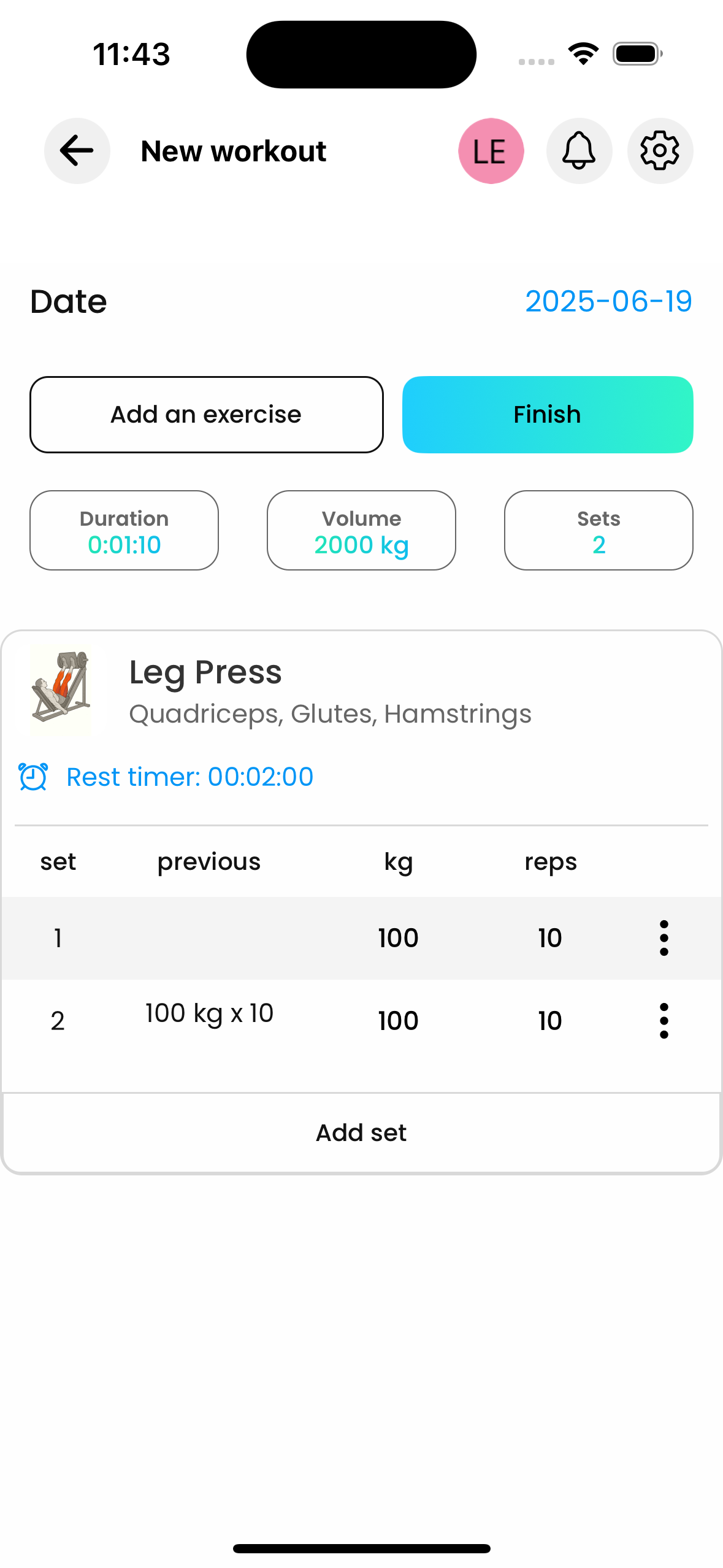
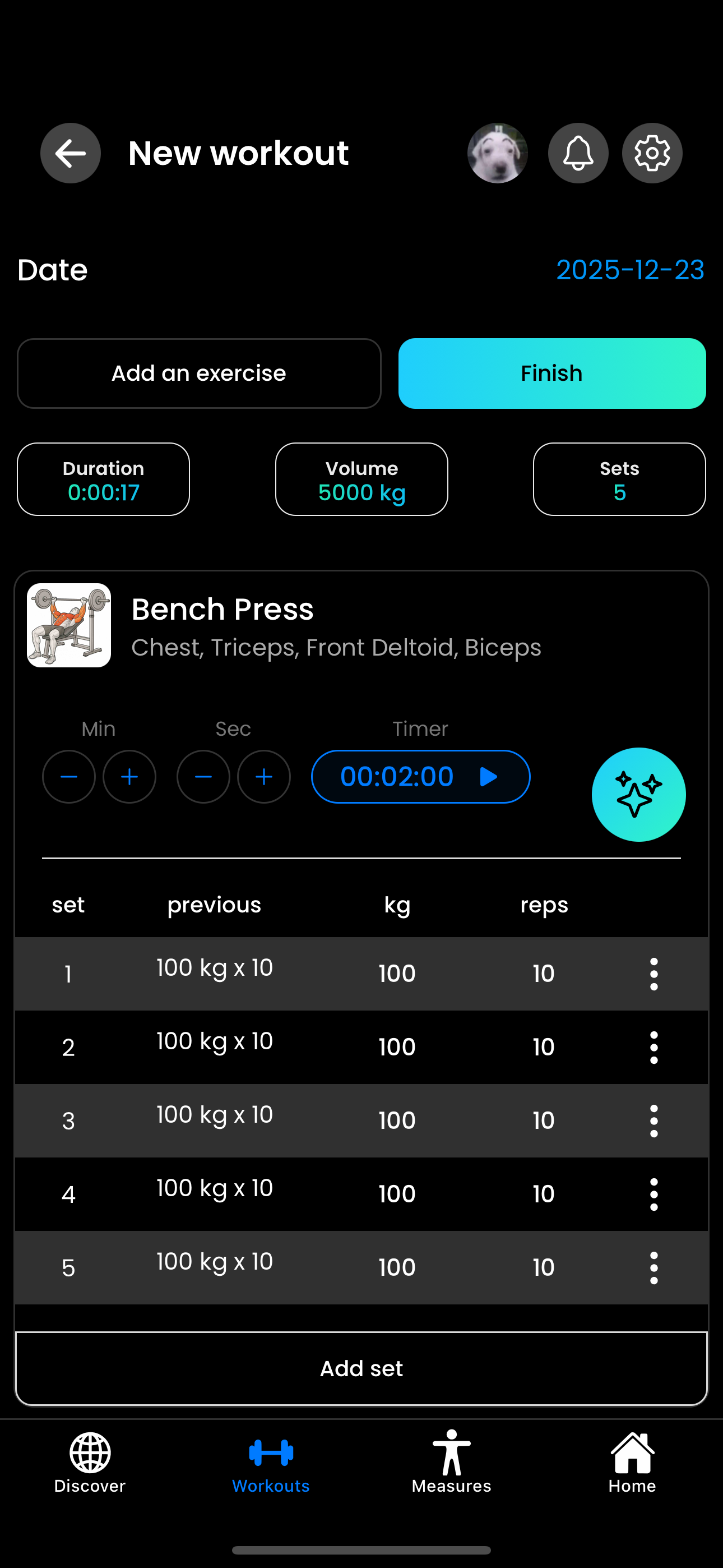
Free Online Workout Tracker (No App Install Needed)
You walk into the gym, you want to track today's session, and the workout app you've heard about is asking you to install, sign up, get a verification email, and skip three "upgrade to Pro" pop-ups before you can log a single set. By the time you're past all that, your rest timer is dead and your warm-up's over.
There's a better way. Gainflow runs in your browser, full workout tracking, no install, no friction, completely free. Open gainflow.app/app, log in with Google in two seconds, and you're tracking sets. Same data syncs to the mobile app if you ever want it there too.
One thing up front: if you're going to lift seriously and want the best long-term experience, AI form analysis, push notifications for rest timers, Apple Health / Health Connect sync, home-screen widgets, full offline mode, the right move is to install the Gainflow mobile app from the App Store or Google Play. Web is the perfect entry point, the desktop companion, and the "I just want to try it without installing anything" path, but mobile is the daily driver.
This article is the long version: what an online workout tracker actually does, how Gainflow Web stacks up against Hevy, Strong, JEFIT, FitNotes, and Fitbod, the step-by-step install paths on iOS / Android / desktop, real workflows from people who use both web and mobile, and the tactical reasons people are quietly moving away from app-only fitness trackers in 2026.
Why People Search for an Online Workout Tracker (Instead of an App)
It's not laziness, it's a specific set of pain points with mobile-only tracking apps. After looking at search trends and what people actually write in Reddit's r/Fitness and r/weightroom, the same six reasons keep coming up:
Six common reasons people skip the app install
"Yet another app" fatigue
Phones already have 80+ apps. Most people don't want a 200 MB install just to check if they can squat heavier than last week. Browser-based means zero space, zero install friction.
Want to plan workouts on a laptop
Building a 12-week program is way easier on a real keyboard. Most app-only trackers force you onto a 5-inch screen for everything. Web version means you plan on desktop, log on phone, same data.
Just want to try before installing
You found a workout tracker on Reddit, want to test if it actually fits how you train. Installing first means commitment. Browser means 3-second test drive, decide later if mobile is worth it.
Tired of "free trial → paywall"
Half the workout apps are technically free but everything useful (custom exercises, charts, history) is locked. Gainflow's web version is free forever, no "free for 7 days then $9.99/mo" trickery.
Need to log from any device
Work laptop, friend's phone, hotel iPad, the family desktop, anywhere with a browser, you log in and your training history is there. No "device limit" nonsense, no "install on this phone first".
Privacy concerns about app permissions
Mobile apps want camera, contacts, location, motion sensors, notifications. Web app wants nothing, just an account. If you're allergic to permission pop-ups, web tracking sidesteps every one of them.
The numbers
Pew Research and App Annie data put the average smartphone user at 80–100 installed apps but only ~30 in active use per month. The bar to install another one is genuinely high, which is exactly why "no install needed" is the killer feature of any 2026 fitness tracker. If you've been holding off because you don't want to manage one more icon, that's a completely rational position.
What a Real Online Workout Tracker Should Do
A web workout tracker isn't useful if it's a watered-down version of the mobile app. To actually replace mobile, it needs to handle every part of the lifting workflow, logging, planning, analytics, library, measurements, the lot.
FULL FEATURE CHECKLIST
- Log every set, weight, reps, RPE, notes, without round-trips to mobile
- Plan future workouts, full routines, mesocycles, deload weeks
- Strength progression charts, see your bench/squat/deadlift trajectory across months
- Personal Records detection, auto-flag every new 1RM estimate, heaviest set, rep PR
- Working rest timer, including audio/visual notifications between sets
- Body measurements & weight tracking, same as the mobile, including progress photos
- CSV export, your data is yours, downloadable any time
- Import from Hevy / Strong, bring years of history without rebuilding
- Full exercise library, searchable, with custom exercise creation
- Same account as mobile, one login, all devices, real-time sync
If the web version is missing any of these, you're being asked to compromise. Gainflow's web tracker has all of them, same database, same auto-detection, same PR engine as the mobile app. Web isn't a "lite version"; it's the same product, exposed through a different interface.
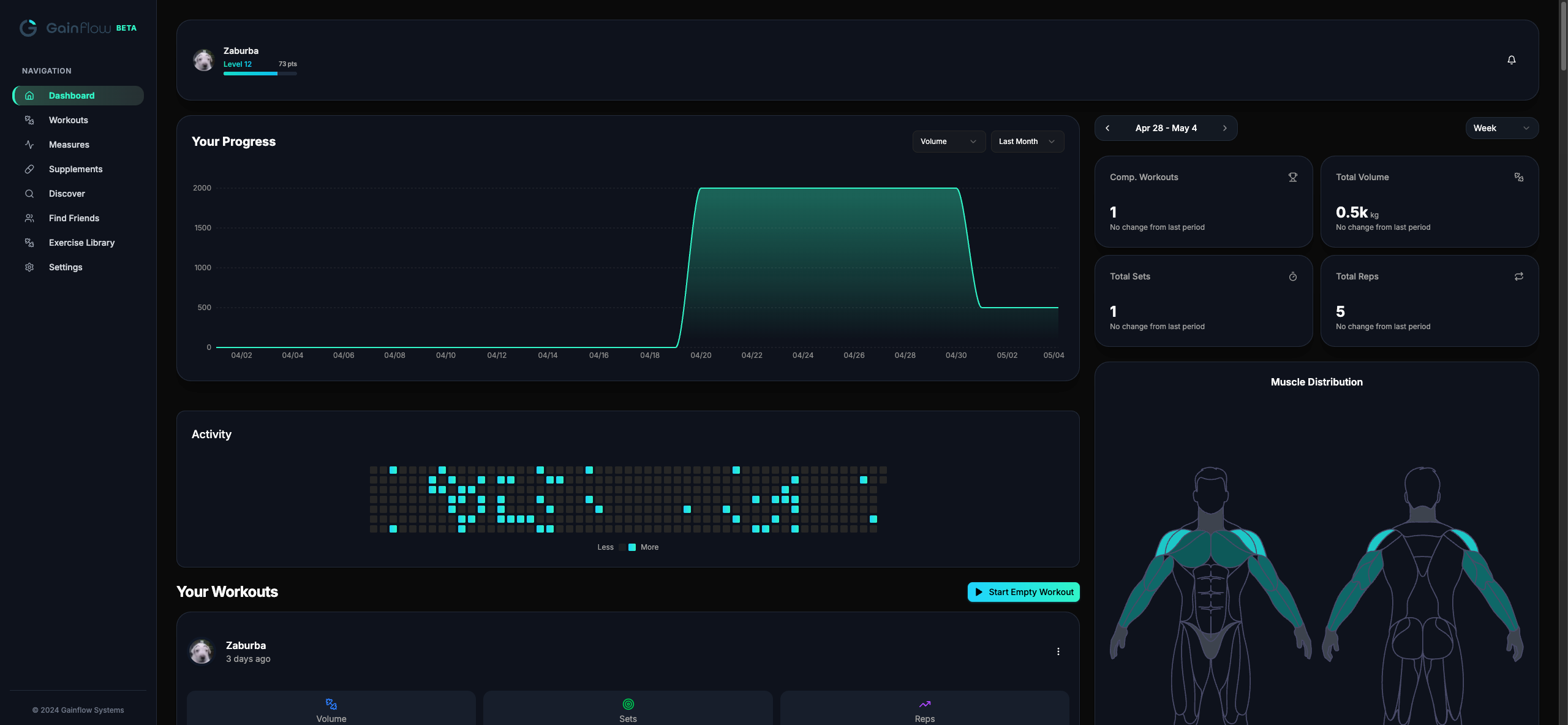
Here's the dashboard you land on after login, workout volume chart, weekly stats, activity heatmap, muscle distribution, all visible at once on a real screen:
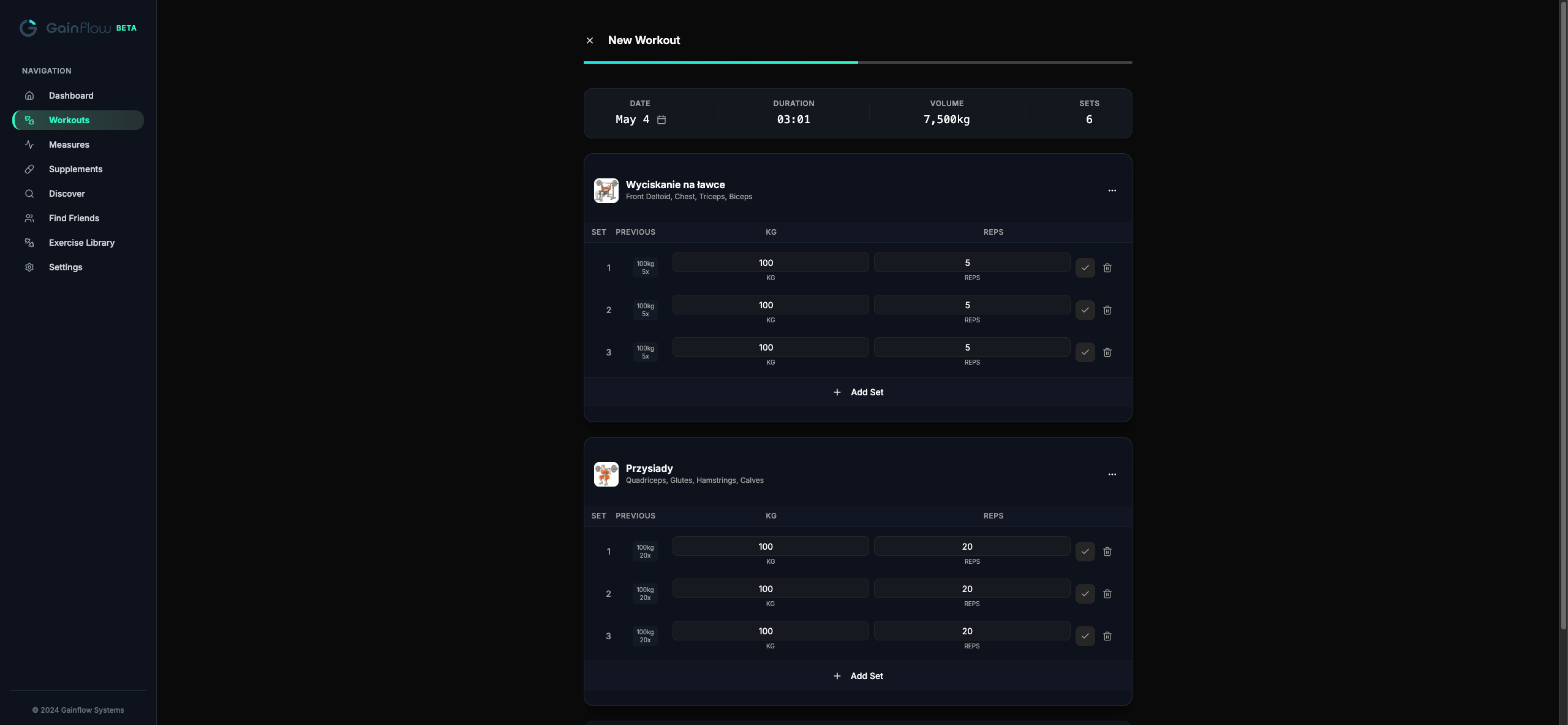
Logging itself happens in a focused workout view, same fields you'd expect on mobile (set, previous, kg, reps), but with the keyboard you actually want to use:
What is a PWA, exactly?
Progressive Web App. A website that can install itself onto your phone or laptop home screen, run in its own window like a native app, and work offline. The user experience is identical to a "real" app, but you skip the App Store / Google Play download step entirely. Gainflow Web is a PWA, which is why "open in browser" and "install as app" are the same thing.
For background on the actual training principle this all serves, see our deep dive on progressive overload, the whole reason tracking matters in the first place.
Gainflow Web vs. Other Workout Trackers (Comparison Table)
There are dozens of fitness apps in 2026. Most of them are mobile-only, some have a web version, and a few hide their best features behind a subscription. Here's how the most-searched alternatives stack up against Gainflow Web on the features that actually matter for serious lifters.
Web tracker comparison – verified May 2026
| Feature | Gainflow Web | Hevy | Strong | JEFIT | FitNotes | Fitbod |
|---|---|---|---|---|---|---|
| Production web version | Yes | Yes (hevy.com) | No (in beta) | Yes | No | No |
| No install needed for full tracking | Yes | Yes (web) | No | Yes (web) | No | No |
| Free tier covers core logging | Yes – unlimited | Partly – 4 routines, 7 custom exercises, 3-month history | Partly – 3 custom routines | Partly – ads on free plan | Yes – free, no ads | No – 3-workout trial only |
| Web ↔ mobile sync | Yes | Yes | no web yet | Yes | Android-focused | no web |
| AI form analysis | Yes (mobile app) | No | No | No | No | No |
| Strong CSV import | Yes | Yes | No | No | No | No |
| Paid tier price (USD) | $0 for the full tracker · from $2.99/mo for advanced AI features in Gainflow Plus (regional pricing) | $2.99/mo · $23.99/yr | $4.99/mo · $29.99/yr | $12.99/mo · $69.99/yr | free | $15.99/mo · $95.99/yr |
Verified against vendor sources in May 2026: Hevy free-tier limits and Pro pricing from help.hevyapp.com; Strong web in beta per strongapp.io help center; Strong Pro pricing per Strong PRO docs; JEFIT Elite pricing per jefit.com/elite; Fitbod 3-workout trial and pricing per Fitbod help center; FitNotes Android-only / no ads per fitnotesapp.com; Hevy import-from-Strong per Hevy import guide. Features and pricing change, always verify on the vendor's site for the latest. Yes = available, Partly = available with caveats, No = not available.
The short read: Gainflow Web is the only tracker in this group that combines a production web version, an unlimited free tier for core logging, real-time web ↔ mobile sync, and CSV import from Strong. Strong has no production web yet (beta in development), FitNotes is Android-focused with no sync, Fitbod is a paid-only app after a 3-workout trial. Hevy comes closest on web but caps the free plan at 4 routines, 7 custom exercises, and 3 months of history; JEFIT has a web version but the free plan runs ads.
If you're switching from one of these, our step-by-step guides are Hevy → Gainflow and Strong → Gainflow. Both work entirely from the web version.
Don't take our word for it
Open gainflow.app/app in another tab right now. Five seconds, no install, no card. Log a single set and decide if it's worth the rest of this article.
When Web Makes More Sense Than Mobile (and Vice Versa)
Honest answer: there's no "better" version. Different contexts, different best fits. Most serious lifters end up using both, web for planning and analysis, mobile for in-gym logging.
Which version when?
Web wins for:
- Building a new program from scratch
- Reviewing 6-month strength trends
- Quick logging when you forgot your phone in the locker
- Trying the app before committing to install
- Anyone who hates mobile keyboards
- PWA users who install the web app to home screen
- iPad users who want a real screen at the gym
- Logging from any computer (work, friend's, library)
Mobile wins for:
- AI Video Analysis (camera in your pocket)
- Quick set logging mid-rest with one thumb
- Push notifications for rest timer
- Apple Health / Health Connect sync
- Home screen widgets
- Offline mode in basement gyms with no signal
- Progress photos from phone camera
- Wearable / smartwatch integration
Best setup for serious lifters: use both. Sign up via web (faster), log workouts on whichever device is closer, plan future blocks on a laptop, record AI form check on phone. One account, all data synced in real time. The whole point of Gainflow is that the choice is yours, not the app's.
How to Install Gainflow as a PWA, Step-by-Step
First, the recommended path: if you're committing to Gainflow as your daily training tracker, install the real mobile app from the App Store (iOS) or Google Play (Android). It takes the same 30 seconds, and you get features the PWA route can't deliver: AI Video Analysis for form check, push notifications for rest timers, full offline mode in basement gyms, Apple Health / Health Connect sync, and home-screen widgets. For serious lifters, that's the better default.
That said, PWA is a great fallback if you can't or don't want to install a native app: maybe you're on a work-managed laptop, an iPad you don't want to fill with apps, a friend's phone, or you're just allergic to App Store / Play installs in general. The PWA gives you a home-screen icon, full-screen mode, and most of the experience (no AI form check, no widgets, no push). Here's exactly how to install it, per platform.
iOS (Safari on iPhone or iPad)
Install Gainflow on iOS in 4 taps
1. Open gainflow.app/app in Safari
PWA install only works in Safari on iOS, Chrome and Firefox on iPhone don't expose the install option (Apple's restriction, not ours).
2. Tap the Share button
Bottom of the screen on iPhone (the square with an arrow), top-right corner on iPad. Same icon you'd use to text a link.
3. Scroll down and tap "Add to Home Screen"
It's in the second row of share-sheet actions. If you don't see it, scroll the actions row to the right.
4. Tap "Add" in the top-right
Confirms the install. Gainflow icon appears on your home screen. Open it from there and it runs in its own window, no Safari chrome, no tabs, looks identical to a native app.
Android (Chrome on phone or tablet)
Install Gainflow on Android in 3 taps
1. Open gainflow.app/app in Chrome
Works in any Chromium-based browser on Android (Chrome, Edge, Brave, Opera). Firefox supports it too via the menu.
2. Tap the three-dot menu, then "Install app"
On most Android browsers, an "Install app" prompt also appears automatically as a banner the first time you visit. Either route works.
3. Confirm install
Gainflow installs to your app drawer and home screen. Android treats it as a real app, it appears in Settings → Apps, you can clear its data, set permissions, etc.
Desktop (Chrome or Edge on Mac, Windows, Linux, Chromebook)
Install Gainflow on desktop in 2 clicks
1. Open gainflow.app/app in Chrome or Edge
Look at the right side of the address bar, there's a small "install" icon (a monitor with a down-arrow). If you don't see it, the page hasn't met the PWA install criteria yet; reload after logging in.
2. Click the install icon, confirm
Gainflow opens in its own window, no browser tabs, no URL bar. On macOS it's in your Applications folder; on Windows in the Start menu; on Chromebook in the launcher. Pin it to your dock and treat it like a native app.
How to Start Tracking, Web Version, in 30 Seconds
No download, no install, no "pick a plan" wall.
Three steps to your first logged set
1. Open gainflow.app/app
Works in any modern browser, Chrome, Safari, Firefox, Edge, on any device. Mobile browser works too if you don't want to install the app. You'll see the login screen.
2. Log in with Google or Apple
Two taps dance. An account is required only because your data needs somewhere to sync, same login works on mobile if you ever install it. After login you land on the dashboard with your progress chart, weekly stats, and an Activity heatmap.
3. Click "Start Empty Workout" or pick a plan
Search the exercise library, click the exercise you want, type your weight and reps in the kg/reps fields, hit the checkmark to confirm the set. From the second set onwards Gainflow auto-suggests weights based on your history. PR detection runs automatically, no manual flagging.
If you've never lifted seriously before, our beginner's strength training guide walks through what to actually log in those first sessions, sets, reps, RPE, and how to read the patterns that emerge after a few weeks.
Power-User Web Features (Things Mobile Literally Can't Do)
A real keyboard and a 14-inch screen unlock workflows that are awkward or impossible on a phone. If you're past the "first month" stage of tracking, these are where the web version starts paying back the time.
Three workflows mobile can't match
Keyboard-first set logging
On web you can fly through a workout with Tab to jump between fields, type the weight, Tab again, type the reps, Enter to save the set. Three keystrokes per set. On mobile, even with autocomplete, it's three taps minimum and your thumb has to hit the right zone every time. Web is genuinely faster for high-volume sessions where you log 30+ sets.
Dual-screen planning + logging
Open Gainflow web on your laptop, your training plan PDF or coach's notes on the other monitor. Log on web while reading the plan side-by-side. On mobile you're constantly app-switching. This is the workflow most coached athletes adopt within a week.
Bulk edit, copy-paste between sessions
Built a perfect Push day? Duplicate it for next week, tweak two exercises, save. On mobile, multi-select and bulk operations are clunky on a small screen. Desktop UI was designed for this kind of fast manipulation, and the web version inherits all of it.
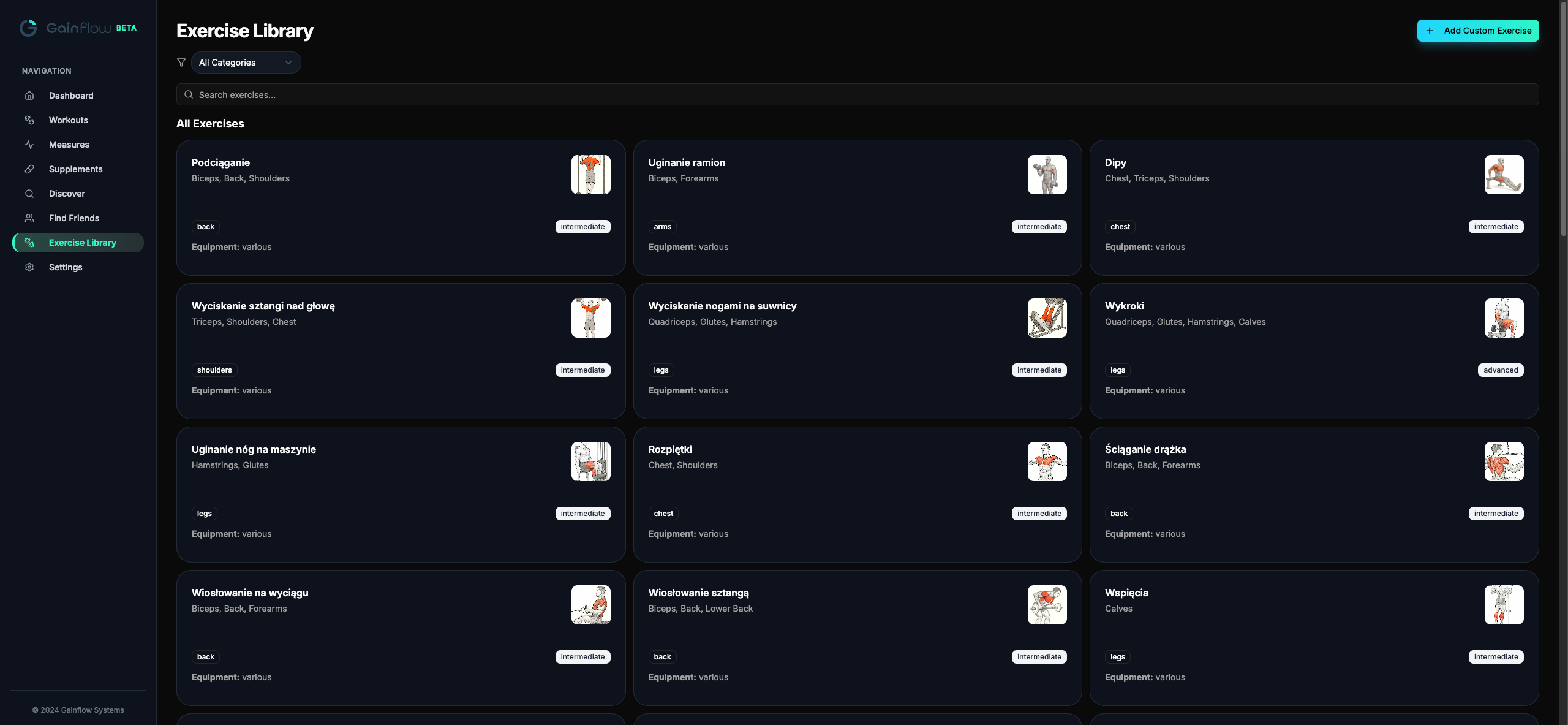
Want a sense of what the exercise library looks like with hundreds of movements indexed and searchable? Here's the web Exercise Library, full search, category filters, custom exercise creation, all on a screen big enough to actually browse:
Pro tip: pin the PWA to your taskbar
Once you've installed Gainflow as a PWA on desktop (see the section above), pin it to your dock or taskbar. It opens with a single click in its own window, same speed as a native app, none of the App Store dance. Most people who do this stop opening Gainflow in a tab entirely within a week.
Try the keyboard workflow now
If the Tab+Enter logging sounds faster than what you're doing today, the only way to know is to feel it. Open gainflow.app/app, start a workout, log five sets without touching the mouse. If it's not faster, close the tab, but most people don't. (And when you're at the gym instead, the App Store / Google Play app is the same thumb-speed tracker, plus AI form check.)
Real Workflow Examples
Three patterns that come up over and over among Gainflow users who use both web and mobile. Pick the one closest to your situation and copy it, these are battle-tested.
The Programmer / Deskbound Lifter
Setup: Sits at a laptop 8+ hours a day. Hits the gym 3–4 times a week, usually right after work.
Workflow: Plans the next week's training on web during a Friday afternoon coffee break, full mesocycle view, copy-paste from previous block, set RPE targets. At the gym, logs on phone (PWA installed). Sunday evening reviews progress charts on the laptop, decides if next week is push, hold, or deload.
Why it works: Planning needs a real keyboard and screen real estate. In-gym logging needs one-thumb speed. Same account, real-time sync, zero friction.
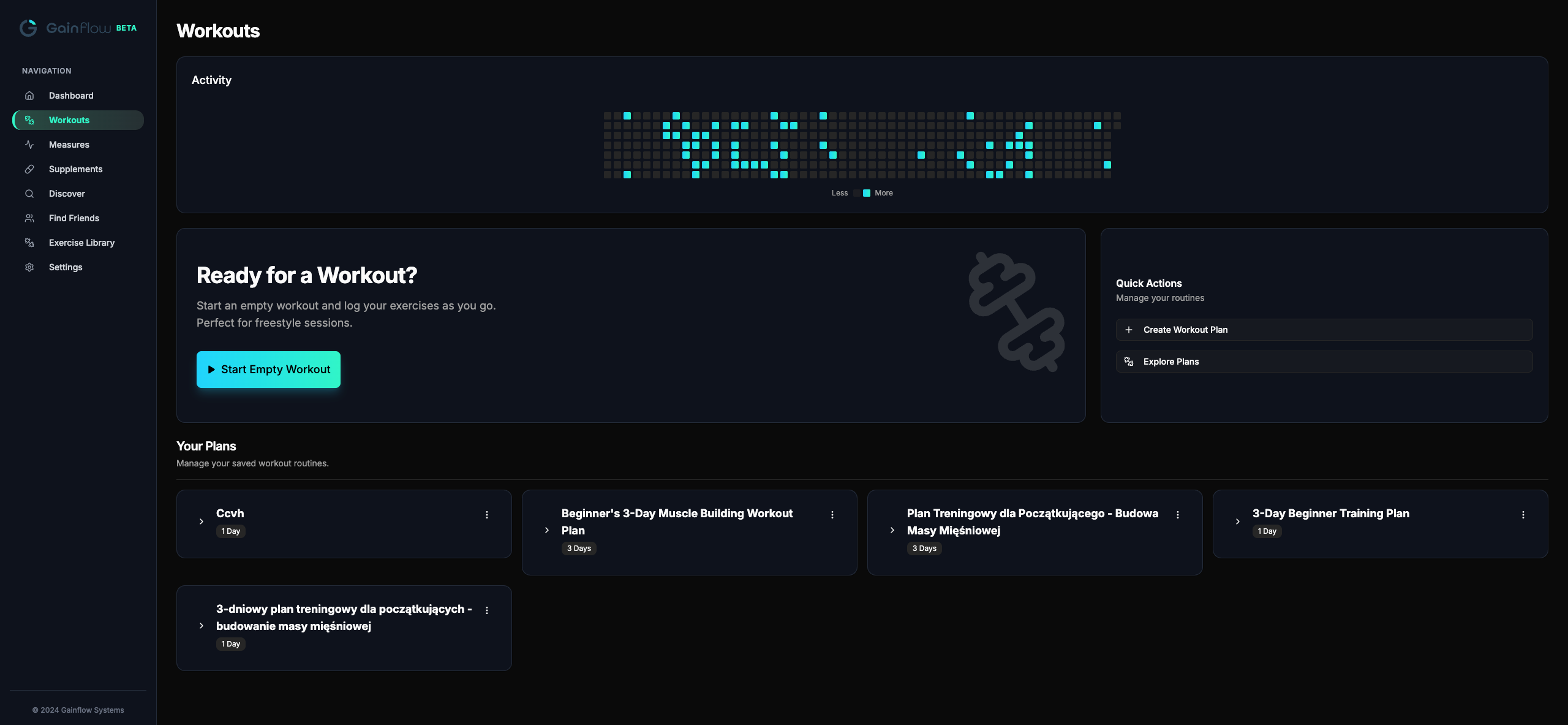
The Workouts page is where most planning happens, start an empty session, save reusable plans, browse what you've already built. On a laptop screen there's room to compare two plans side-by-side, copy exercises between them, and edit volume targets without scrolling:
The iPad Lifter
Setup: Brings an iPad to the gym instead of a phone, bigger screen, easier to read between sets, doubles as a music player.
Workflow: Opens Gainflow web in Safari on iPad, installed as a PWA from the home screen. Logs sets on the iPad's keyboard or touchscreen. No mobile app installed at all, never needed it.
Why it works: The iPhone app's small size doesn't justify itself when you have an iPad anyway. Web on iPad gives you a proper "tablet" experience without paying twice for the same product.
The Traveler / Multi-Device Lifter
Setup: Travels for work, hits hotel gyms, sometimes uses a friend's phone, occasionally lifts at the office gym between meetings.
Workflow: Web is the constant. Logs in on whatever device is in front of them, work laptop, hotel iPad, friend's phone browser, even kiosk computers in airline lounges. No "install on this device first" friction. History is always there because the account is in the cloud.
Why it works: Mobile-only apps assume you'll always have your phone. Reality is messier, phones die, get left in lockers, run out of storage. Web makes the tracker a service, not a device.
If you're still figuring out a routine, the why your squat isn't increasing guide has practical advice on what to actually log to spot a stall before it costs you a month.
How Web ↔ Mobile Sync Actually Works
"Sync" is one of those words app makers wave around without explaining. Here's the concrete version for Gainflow.
One account, one database, real-time updates. Sign in on web with the same Google or Apple ID you use on mobile (or vice-versa). Every set, exercise, plan, and measurement lives on the server, not the device. Log a workout on web in the morning, it appears on your phone the next time you open it (usually within seconds while online). Log a set on mobile mid-workout, it shows up if you refresh the web page on your laptop.
Conflict resolution: if you somehow edit the same set in two places at once (rare, but possible), the most recent edit wins. There's no manual merge dialog because the data model is granular enough that conflicts are practically impossible, you'd have to be editing the exact same set in two browser tabs in the same second.
Offline grace: if you lose connectivity mid-workout, both web and mobile cache locally and sync when reconnection happens. The web version is the one place where mobile still has a slight edge, if you lift in a basement gym with zero signal, install the mobile app for full-confidence offline logging.
Common Misconceptions About Web Trackers
"Web app means slow"
Old assumption from 2010s. Modern web apps run on the same engines as native, logging a set in Gainflow web takes the same 2 seconds as in mobile. Tap weight, tap reps, tap save. No spinning wheels.
"Web means no offline"
Mostly outdated. Gainflow web caches your last session and routine, so you can log even if your gym Wi-Fi drops mid-workout. Data syncs when you're back online. For full offline guarantees in basement gyms with zero signal, mobile is still the better bet, but for 90% of users on city gym Wi-Fi, web is fine.
"I need an app for the lockscreen widget"
Right, and that's a great reason to install the actual mobile app from the App Store or Google Play. Widgets, push notifications, AI Video Analysis, and full offline mode all require the native app, they're the things web (and PWA) genuinely can't do. If you're going to lift regularly, the mobile app is the better long-term setup. The PWA route exists as a fallback for people who really don't want to install anything from the App Store / Play.
"Web trackers don't have AI form check"
True for most, Gainflow's AI Video Analysis runs on-device through the mobile app (privacy: your form videos never touch a server). For now, AI form check is mobile-only. Web handles everything else: logging, planning, analytics, PR tracking, library, import/export.
"I'll lose my data if I log out of the browser"
Nope. Your data lives on the server, tied to your Google/Apple account, not in browser cookies or local storage. Log out, switch browsers, switch laptops, log back in and everything is exactly as you left it. The browser is just a viewport, not where the data lives.
"Free web trackers must sell my data"
Not true for Gainflow. Free tier is funded by the optional Plus subscription on mobile (advanced AI features), not by data sales. We don't sell, share, or monetize your training history. Privacy details are in the next section.
Red flags to watch for in OTHER web trackers
"Free" but you can't log without an upgrade prompt
Some trackers technically let you sign up free but interrupt every fifth set with an upgrade modal. That's a paywall in disguise.
No CSV export
If you can't export your own data, the tracker has you locked in. Always check before importing months of history.
"Web version" that's actually one read-only page
A few apps advertise "web access" but the web version only shows a profile or a single chart, you can't actually log there. Test it before trusting the marketing.
No real-time sync (manual export/import)
If web → mobile requires you to download a CSV and re-import, it's not really sync. Real sync is automatic, instant, two-way.
Privacy & Data Ownership
A free web tracker that takes Google login is the kind of thing where it's reasonable to ask "what's the catch?" Here's the honest breakdown for Gainflow.
What we store: your training data, sets, reps, weights, exercise notes, body measurements, progress photos if you upload them. Nothing else. We don't read your contacts, scrape your photos library, or track your location.
What we don't do: we don't sell your data, we don't share it with advertisers, we don't build "anonymized aggregate" reports for fitness companies. The free tier is funded by the optional Gainflow Plus subscription on mobile, which unlocks advanced AI features. That's the whole business model.
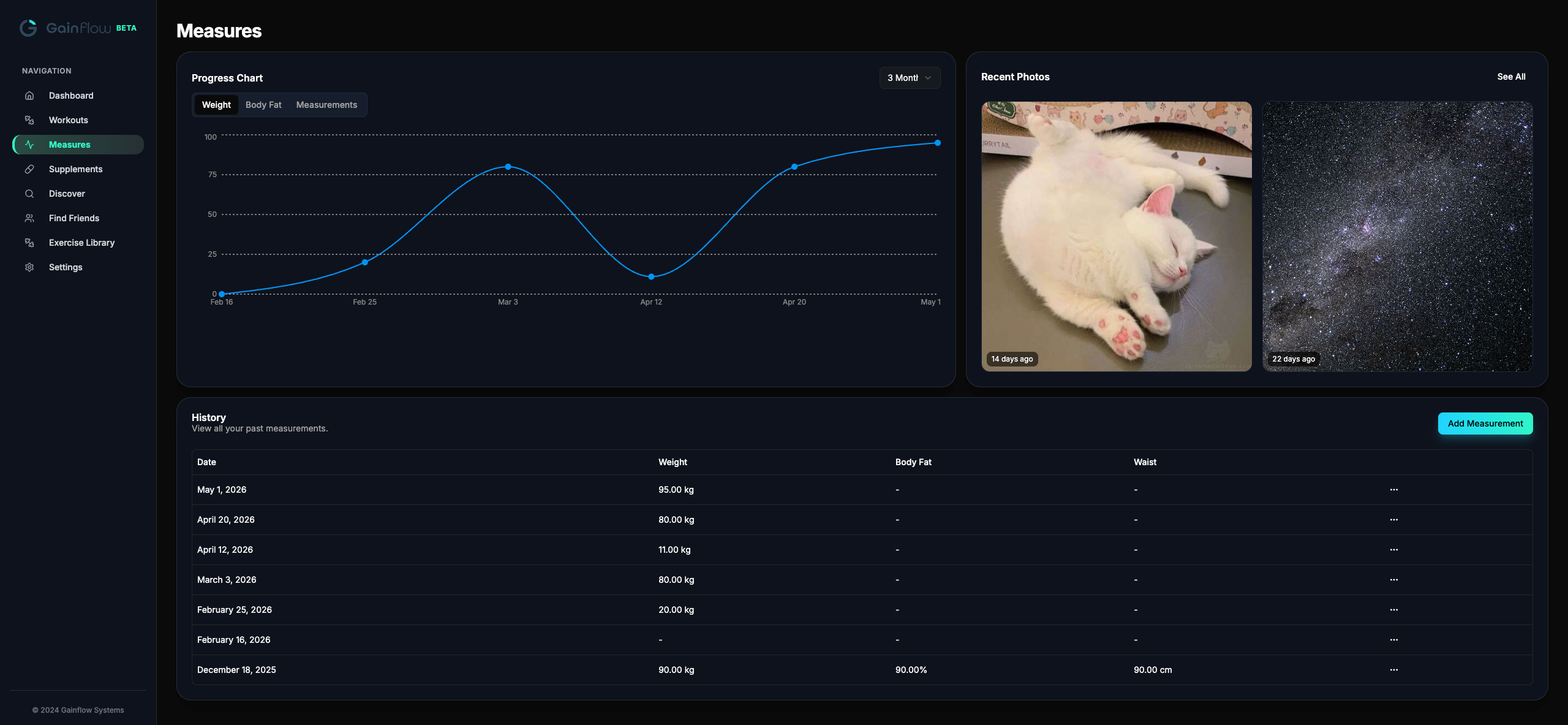
Your data is portable. CSV export of every workout, every measurement, every PR is in Settings → Export. Your workouts and progress photos are visible in the Measures view exactly as you logged them, and downloadable in a format any other tracker can read:
The paper-journal test
If you'd never copy your handwritten training journal and mail it to a marketing company, the same logic applies to digital trackers. The reason we built CSV export from day one is so you never have to wonder: your data is yours, downloadable any time, period. If we ever shut down (we won't, but humor the thought), you walk away with a clean copy.
For more on the philosophy of "your data is yours" vs. handing your training history to a vendor, see our take on paper journals vs. workout apps.
FAQ: Online Workout Tracking
Is Gainflow's online tracker really free?
Yes. Workout logging, planning, charts, PR detection, body measurements, exercise library, and CSV import/export are all free forever. The only paid tier (Gainflow Plus) unlocks advanced AI features on mobile, not basic tracking.
Does the web version sync with the mobile app?
Yes. Same account, same database. Log a workout on web in the morning, the workout shows up on your phone instantly. No manual sync, no "export then import" nonsense.
Can I use it on my iPad / tablet?
Absolutely. The web tracker is fully responsive, works great on iPad, Android tablets, and Chromebooks. Many lifters with iPads at the gym prefer web over the iPhone app for the bigger screen, and never install the mobile app at all.
What if I lose internet mid-workout?
Your current routine and last session are cached locally, you can finish logging, and everything syncs when you're back online. For guaranteed offline gym sessions in places with zero signal, the mobile app is more reliable.
Can I import my Hevy or Strong data into the web tracker?
Yes, full CSV import works in the web version, same as mobile. Auto-detects format (Hevy, Strong, Gainflow). Read the dedicated guides: import from Hevy · import from Strong.
Can I install the web version as an app on my phone?
Yes, Gainflow web is a PWA (Progressive Web App). The full step-by-step is in the PWA install section above (covers iOS, Android, desktop). Note: AI Video Analysis still requires the actual mobile app from the App Store / Google Play.
What browsers are supported?
Chrome, Safari, Firefox, Edge, Brave, Opera, all modern browsers from the last 3 years. No Internet Explorer support (it's been dead for years anyway).
Does Gainflow Web work on iPad without the mobile app?
Yes, and many users prefer it that way. iPad is too big for the iPhone app's portrait UI but perfect for the web version's responsive layout. Install Gainflow Web as a PWA from Safari on iPad and you have a tablet-native experience without ever touching the App Store.
Will my data be deleted if I don't log in for a long time?
No. Your account and training history are kept indefinitely. Take a six-month break from training, log back in, your PRs and routines are exactly where you left them.
Can I share my web account with my coach?
You can share read access by exporting CSV and emailing it, or by giving them screen-share view of your charts. We don't currently support multi-user shared accounts (it's on the roadmap). For now, the workflow most coached lifters use is: lifter logs on web/mobile, coach reviews via shared CSV or screen-share.
Is the web version the same code as mobile?
Same backend (one database, one PR-detection engine, one analytics layer), different frontends optimized for the device. Web is built for keyboards and big screens, mobile for thumbs and small ones. Both pull from and write to the same data.
Does the PWA work without internet?
Partially. The installed PWA caches your last session and routine, so you can log offline and it'll sync when you reconnect. For full offline confidence in zero-signal environments, the mobile app is still the more reliable option.
The Bottom Line
The whole "you must install our app or nothing" approach to fitness tracking is outdated. Modern lifters want options: web for planning and analysis on a real screen, mobile for camera-based AI and in-gym logging, both syncing into the same account. Both should be there for you, neither should be locked behind a paywall.
Gainflow Web is the only tracker (as of 2026) that combines a real, full-featured web version, free-forever access to all the basics, PWA install on every platform, real-time mobile sync, and CSV import from both Hevy and Strong.
The recommended setup for serious lifters: install the Gainflow mobile app from the App Store or Google Play for daily in-gym logging (AI form check, push notifications, widgets, full offline), and use the web version on your laptop for program design and progress review. Same account, both work everywhere, zero friction between them.
If you've been holding off because you don't want yet another mobile install, just open the browser version. Track your next workout in 30 seconds. Decide later if you want to upgrade to the full mobile experience. Either way, it's free, your data stays yours, and you own how you train.
Track Your Next Workout, No Install Needed
Open Gainflow in your browser. Log in in two seconds. Free forever, full progressive overload tracking, PR detection, and Hevy/Strong import. Add mobile later if you want AI form check.